
Online security basics: the things that actually matter
Advertising disclosure
This site is funded by partner links: if you buy through a marked link elsewhere on the site, CLEAN STANDARD s.r.o. earns a commission and your price is unchanged. This page contains no partner links. It is reference material and sells nothing. See our editorial policy.
Seven measures cover most of the realistic risk to a home user. Six of them are free. None of them requires you to understand cryptography. This page explains what each one does and why it works, in the order of how much protection it buys you per minute spent.
Why defence works in layers
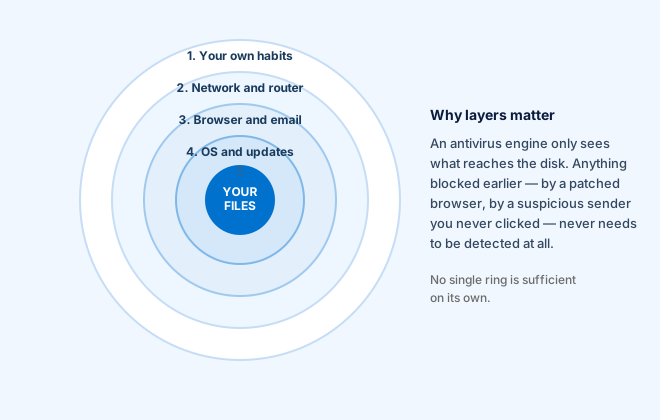
Every measure below fails sometimes. That is not an argument against any of them; it is the argument for having several. An attack has to get through all the rings, and each one it clears costs the attacker something. The innermost ring — the antivirus engine — only ever sees what the outer rings let through.
Notice which ring is outermost. Most successful attacks on home users do not defeat any software at all. They persuade a person to type a password into a convincing page, approve a payment, or install something willingly.
1. Apply updates promptly
This is the highest-value habit on the page and the one most often postponed.
The great majority of vulnerabilities exploited against ordinary users already had a patch available when they were exploited. The attack works because the patch was not installed. When a vendor publishes a security update, it also publishes, implicitly, a description of the weakness — which is why the window between a patch and its exploitation keeps getting shorter.
- Leave automatic updates on for your operating system.
- Let your browser restart when it asks. Browsers are the most exposed software you run.
- Update your phone. Phones are computers holding your second authentication factor.
- Remove software you no longer use. Unused software still has vulnerabilities and still stops being supported.
- Replace devices that no longer receive security updates. An unsupported router or phone does not become safe by being familiar.
2. Unique passwords, held by a manager
Password reuse is the most exploited weakness in consumer security, and the mechanism is simple. A small site is breached and its user list is traded. Attackers take those addresses and passwords and try them, automatically, against email providers, banks and shops. This is called credential stuffing, and it works only when a password has been used twice.
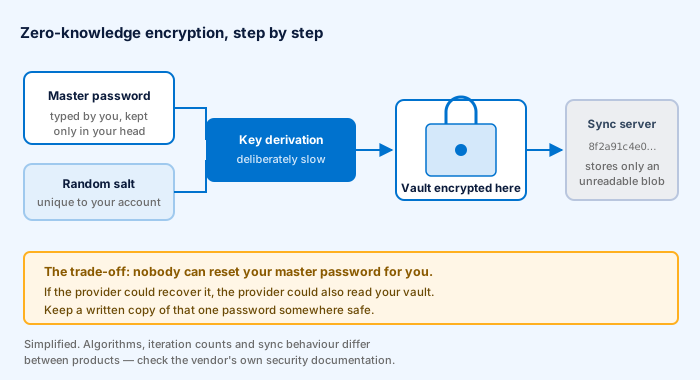
You cannot remember dozens of unique strong passwords, which is why you should not try. A password manager generates and stores them, encrypted with a key derived from one master password you do remember. The diagram above shows why the provider cannot read your vault — and therefore why it cannot reset your master password either. Write that one password down and keep the paper somewhere physically safe.
What makes a password strong
Length, overwhelmingly. A passphrase of four or five unrelated words is both stronger and easier to type than a short string of substituted symbols. The old advice about mixing character classes produced passwords that were hard for people and easy for machines.
The single most important password is the one on your email account, because email is the reset channel for everything else. Whoever controls your email can eventually control most of your other accounts.
3. Two-factor authentication, email first
Two-factor authentication means a stolen password is not enough on its own. Set it up on your email account today, even if you do nothing else on this page. Then your bank, then anything that can spend money.
Not all second factors are equal:
- Hardware security keys (the FIDO2 / WebAuthn standard) are the strongest widely available option, because the key checks the site's real address and simply will not authenticate to a lookalike domain. This is the only method that reliably defeats a real-time phishing site.
- Authenticator apps generating six-digit codes are a large improvement over passwords alone. A code can still be phished if you type it into a fake page within its validity window.
- Codes by SMS are the weakest of the three, because a number can be transferred away from you. They are still far better than nothing — if SMS is what a service offers, use it.
Store the recovery codes a service gives you at setup. Losing your second factor without them is a genuinely difficult situation.
4. Backups you have actually restored from
Backups are the only reliable answer to ransomware, and the only answer to a failed drive, a stolen laptop or your own mistake. No scanner substitutes for one.
The conventional shape is 3-2-1: three copies of anything you care about, on two different kinds of storage, with one of them off-site. For a household that usually means the working copy, an external drive, and a cloud or a drive kept somewhere else.
The part everybody skips
A backup you have never restored from is a hypothesis, not a backup. Once — today is fine — restore a few files from it to a new folder and confirm they open. People discover that the backup has silently failed for two years at exactly the moment they need it.
Also: a permanently connected external drive is not protection against ransomware, which will encrypt it too. Either disconnect it between backups or use storage with versioning that the attacker cannot overwrite.
5. Recognising phishing
If you learn one thing from this page, learn this section. Phishing bypasses every technical control by asking you to open the door.
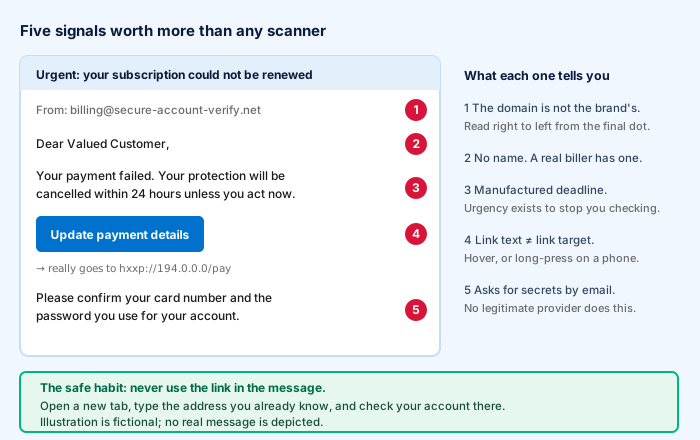
The signals in the diagram are worth internalising, but the habit matters more than the checklist:
The habit that makes the checklist unnecessary
Never act on a link in a message about an account. Not in email, not in SMS, not in a chat app. Open a new tab, type the address you already know, and check the account there. If the warning was genuine you will see it. If it was not, you have lost five seconds.
Two modern variants worth knowing about:
- The telephone version. Somebody calls claiming to be from your bank or a software company and asks you to install a remote-access tool or read out a code. Hang up and call back on the number printed on your card or on the company's official site — never a number the caller gives you.
- Two-factor fatigue. If your phone is flooded with approval prompts you did not initiate, somebody has your password and is hoping you press “approve” to make it stop. Do not. Change that password immediately.
6. Keep an antivirus engine running
An antivirus engine catches the commodity attacks — the malicious download, the infected attachment, the file copied from a memory stick. That is worth having, and on most platforms you already have it.
Microsoft Defender is built into Windows 10 and 11 and enabled by default. If you buy a third-party product it normally takes over and deactivates Defender's real-time component automatically — that is correct and intended. Never run two real-time scanners at once: they inspect each other's activity and can slow a machine badly.
Whether a paid product is worth buying is a separate question, treated in our buying guide and in the main article.
7. Encrypt the disk, lock the screen
These two protect against the most mundane incident of all: somebody physically having your device.
- Full-disk encryption — BitLocker on Windows, FileVault on macOS, on by default on current phones — means a stolen device is a lost device and not a data breach.
- A screen lock with a short timeout. Biometrics are convenient and the underlying passcode is what actually protects the data, so make the passcode a real one.
- Find-my-device, so you can locate and remotely erase a lost phone or laptop.
What to do when you learn you are in a breach
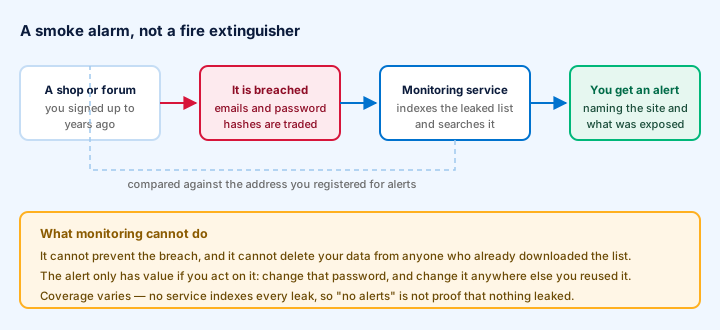
Sooner or later a service you used will be breached and you will be told, either by the service or by a monitoring tool. The response is short:
- Change the password on that service.
- Change it anywhere you reused it. This is the step that matters, and the one a password manager makes possible.
- Turn on two-factor authentication there if it is offered.
- Watch for follow-up phishing. Breach data makes convincing scam messages, because the sender genuinely knows where you had an account.
- If payment details were exposed, tell your bank and watch the statements.
Note what monitoring cannot do: it cannot prevent the breach, and it cannot remove your data from anyone who already downloaded the list. No alerts is not evidence that nothing leaked, because no service indexes every leak.
Five things people worry about too much
- “Is this Wi-Fi safe?” Nearly all web traffic is HTTPS-encrypted already. Public Wi-Fi is far less dangerous than it was a decade ago. A VPN adds a layer; the lock in the address bar was doing most of the work.
- Registry cleaners and speed boosters. Modest at best. If a machine is slow because of its hardware, no utility changes that.
- Incognito mode as privacy. It stops your browser keeping local history. It does not hide anything from the sites you visit, your employer or your ISP.
- Complex password rules. Length beats character-class gymnastics, and forced rotation of a strong unique password makes things worse, not better.
- Webcam takeovers. Real but rare, and the “we filmed you” email you received is a template sent to millions. A sticker over the lens costs nothing if it helps you sleep; the email is not evidence of anything.
Written by Oliver Cook. General information for home users, not professional security advice for an organisation. Product and company names are trademarks of their respective owners; this site is independent of all of them. All diagrams on this page are original SVG files drawn for this site.