
How to choose consumer security software without being sold to
Advertising disclosure
This site is funded by partner links: if you buy through a marked link elsewhere on the site, CLEAN STANDARD s.r.o. earns a commission and your price is unchanged. This particular page contains no partner links at all — it is reference material, and we would rather it stayed useful than earned anything.
Most buying guides are a list of products in an order somebody was paid to arrange. This one is a method: a set of questions to answer before you look at any product, so that when you do look, you already know what you are looking for.
First: do you need to buy anything?
Start here, because for a meaningful number of people the answer is no, and no product page will ever tell you that.
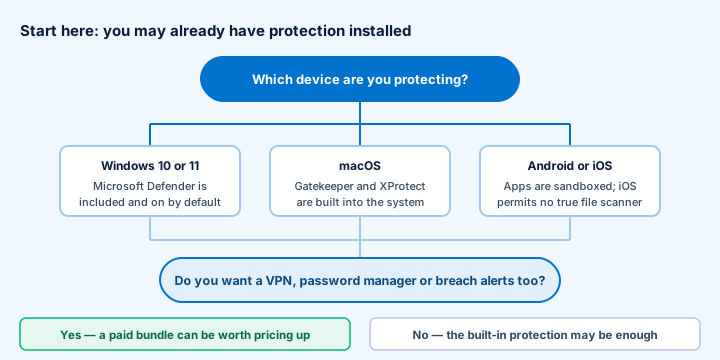
Windows 10 and 11 include Microsoft Defender Antivirus, switched on by default, updated through Windows Update, at no additional cost. It has performed respectably in independent laboratory testing for several years. macOS has Gatekeeper, XProtect and mandatory notarisation of distributed software. Android sandboxes applications and screens the Play Store with Play Protect. iOS sandboxes so thoroughly that no third-party app can scan another app's files — an iOS “antivirus” is in reality a web filter, a VPN and a breach-alert service under a familiar name.
So the question is not “am I protected?” but “what do I want that I do not already have?” Usually the honest answer is one of: a VPN, a password manager, breach alerts, protection for a platform where the built-in option is weaker, or simply one product and one support contact instead of four.
What are you actually protecting against?
Different threats are stopped by different things, and a great deal of money is spent on the wrong component. Broadly:
| What you are worried about | What actually helps most |
|---|---|
| Ransomware encrypting your files | Offline or versioned backups, first and above all. Then behavioural detection and prompt OS updates. No scanner is a substitute for a backup you can restore from. |
| Your accounts being taken over | A password manager and two-factor authentication, starting with your email account. Password reuse is the single most exploited weakness there is. |
| Phishing and scam messages | Knowing the signals. Browser and email filters help but always lag new domains, which often live only hours. |
| Malware from downloads | A real-time antivirus engine — built-in or paid — plus restraint about what you install and from where. |
| Snooping on public Wi-Fi | A VPN, and the fact that nearly all traffic is already HTTPS-encrypted, which covers most of this on its own. |
| A lost or stolen laptop or phone | Full-disk encryption (BitLocker, FileVault, on by default on modern phones) and a screen lock. Not an antivirus question at all. |
| Your data appearing in a leak | Unique passwords, so a leak at one service stays at one service. Breach monitoring tells you afterwards; it cannot prevent anything. |
Two of the seven rows are answered by things that cost nothing. That is worth knowing before you open a checkout page.
How many devices, and which platforms?
Count the devices you actually want covered, including other people's in the household, and note their operating systems. Then check three things in any plan:
- The device count, and whether it is per device or per person.
- Which platforms the licence covers — some plans are Windows-only.
- Whether every component is available on every platform. This is where plans most often disappoint: the headline feature list frequently describes the Windows client, and the macOS, Android and iOS versions have fewer components.
Bundle or separate tools?
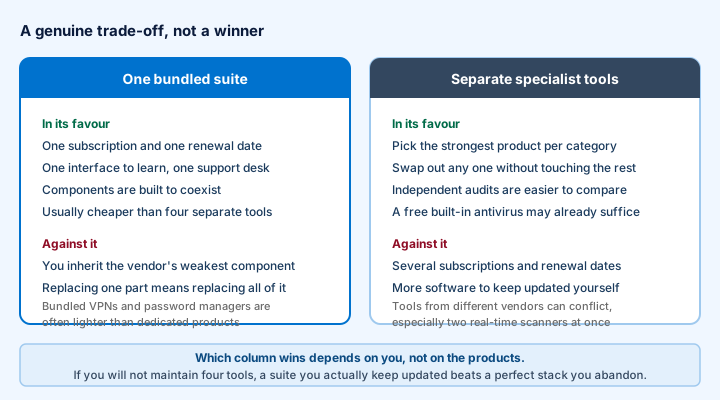
There is no universally right answer, and anybody who tells you otherwise is selling one of the two columns. The question that decides it is not technical: how much maintenance will you actually do? A suite you keep renewed protects you; four specialist tools you meant to renew do not.
Our detailed treatment of this trade-off is in the main article.
How to read an independent lab report
Three laboratories publish comparative consumer testing worth your time: AV-TEST (Germany), AV-Comparatives (Austria) and SE Labs (United Kingdom). All three publish their methodology, which is the first thing that separates a test from an advertisement.
- Check the date. A result from three years ago describes an engine that no longer exists.
- Check which test it is. “Real-world protection” and “malware protection” measure different things.
- Read the false-positive column, which sits next to the detection figure and is left out of every marketing slide. A product that blocks everything including your accounting software is not a good product.
- Look at the whole field. A test in which the strongest competitors did not participate tells you little.
- Ignore any badge that does not link to a report. If you cannot reach the underlying document in one click, treat the badge as decoration.
- Remember what is not tested. Labs test detection, performance and usability. They do not test whether the VPN's no-logs claim is true, whether support answers, or whether the renewal price is reasonable.
How to read the price
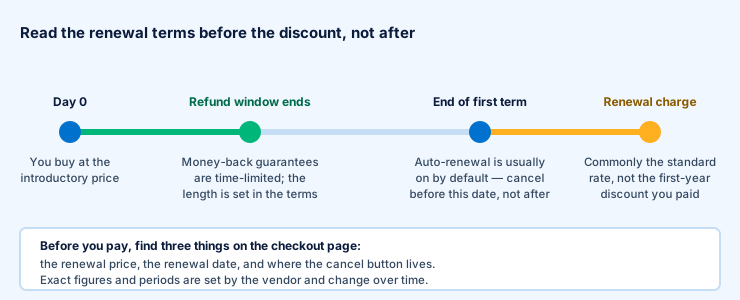
Consumer security is sold as a discounted first term followed by automatic renewal at the standard rate. That is lawful and normal, and it is also the most common source of complaints in the category, because the first price is memorable and the second is not.
Before you enter a card number, find these on the page:
- The renewal price and the renewal date. EU consumer law requires the trader to give you clear pre-contractual information about the total price and the duration of the contract before you are bound. It is on the page. Read it.
- The length and conditions of the money-back window. This is a contractual promise from the vendor and is separate from your statutory rights.
- Where the cancellation setting is in the account area. Find it before you need it, not after.
- What the plan covers — devices, platforms, components.
Your statutory right of withdrawal
For a distance contract with a trader, EU consumer law gives a 14-day right of withdrawal. For digital content and services there is an exception: if you expressly ask for performance to begin immediately and acknowledge that you lose the right, you can lose it — often via a tick-box at checkout. General information, not legal advice about your particular contract.
Marketing signals that should make you stop
- A page that says your device is infected. A web page cannot scan your computer. If it claims to have found threats, it has found nothing.
- A countdown timer. If the offer is genuine it will survive you thinking about it. Reload the page — a timer that resets was never real.
- “Only N licences left.” Software does not run out.
- Guaranteed results. Nothing makes you “100 % protected”, “unhackable” or “completely anonymous”. Security reduces risk; it does not eliminate it.
- Scores with no source. A rating out of ten from a site that ran no tests is decoration.
- Testimonials with stock photographs. Reverse-image search one. You will often find the same face selling something unrelated.
- Comparison tables where every rival has a red cross. Real products have real strengths; a table where the competition fails on every row was drawn to a conclusion.
- Unlabelled links. If a review site never mentions how it is paid, the answer is still commissions — undisclosed ones.
The one-page checklist
- Confirm what protection your devices already have built in.
- Write down which of the seven worries above actually apply to you.
- Check whether the answer is free (backups, updates, two-factor authentication) before it is paid.
- Count devices and platforms; check the components exist on each platform.
- Decide bundle versus separate tools on how much maintenance you will really do.
- Look up the product in a current lab report; read the false-positive column.
- Find the renewal price, renewal date, refund window and cancellation setting.
- Walk away from any page using a countdown, a fake scan or a guaranteed result.
- Turn on two-factor authentication for your email today, whatever you decide about buying.
Written by Oliver Cook. General information about consumer software, not professional security or legal advice. Product and company names are trademarks of their respective owners; this site is independent of all of them. Diagrams on this page are original SVG files drawn for this site.