
TotalAV in 2026: what is actually in the suite, and how to judge it
Advertising disclosure
This article contains partner links to TotalAV. If you take out a subscription after following one, CLEAN STANDARD s.r.o. receives a commission from the merchant. Your price is not affected, and no commission is paid for reading the page.
The commission does not buy a verdict. Every partner link below is labelled, and the critical sections — including what the suite does not do and how renewal pricing works — were written to the same standard as the rest. Our editorial policy sets out what we refuse to publish.
We are not affiliated with TotalAV. Features, prices and terms are set by the vendor and change; the vendor’s own current information prevails over anything here.
TotalAV is sold as a single subscription that replaces four or five separate purchases: an antivirus engine, a VPN, a password manager, a breach-alert service and a set of device clean-up tools. That bundling is the whole proposition, and it is also where the honest questions live. This article sets out what each component does, what it demonstrably does not do, how the pricing model works over a full subscription cycle, and how to decide whether you need a paid suite at all.
We have deliberately not given this product a score. A single number out of ten hides the only thing that matters here — whether your situation matches what the bundle is good at. Where we could not verify a claim independently, we say who is making it instead of repeating it as fact.
What TotalAV is, and who publishes it
TotalAV is a consumer security suite for Windows, macOS, Android and iOS. It is marketed by Protected.net, a company based in the United Kingdom, which also publishes several adjacent consumer products. Corporate details are set out on the vendor’s own site and in the relevant company register, and those sources prevail over this summary.
It belongs to a category — the “all-in-one suite” — that has become the dominant way consumer security is sold. The competitive claim is not that any one component beats the best specialist tool in its category. It is that one subscription, one installer and one renewal date is easier to actually keep running than four of each. Whether that argument works for you is the subject of the section on suites versus separate tools.
What is actually in the box
The suite is modular, and which modules you get depends on the plan you buy. The table below describes what each component is for, in plain terms, rather than repeating marketing names that change between releases.
| Component | What it does | What it does not do |
|---|---|---|
| Antivirus engine | Scans files on demand and, on paid plans, in real time; quarantines what it judges malicious. | It cannot undo a file you already uploaded, or a password you already typed into a fake site. |
| Web / browser protection | A browser extension that warns on or blocks URLs matching known malicious and phishing lists. | Blocklists lag behind new phishing domains, which often live only hours. |
| VPN | Encrypts traffic between your device and the provider’s server, and presents that server’s address to sites. | It does not make you anonymous, block malware, or hide your activity from the sites you log into. |
| Password manager | Generates, stores and fills strong unique passwords, encrypted with a key derived from your master password. | It does not protect an account that has no second factor if the password is phished directly. |
| Breach monitoring | Checks whether your email address appears in leaked data sets that the service has indexed. | It cannot prevent a breach or remove leaked data, and no service indexes every leak. |
| Device clean-up | Finds temporary files, browser caches, duplicates and startup entries you may want to remove. | It will not make aging hardware meaningfully faster; see the section below. |
One thing to check before you assume you have a feature
Vendors move components between tiers. A feature listed in a review a year old may now sit one plan higher, or be sold separately. Read the current plan comparison on the checkout page rather than trusting any third-party list, including this one.
How the scanning engine decides what is malicious
Every mainstream antivirus product uses a combination of three techniques, and understanding them tells you more about what to expect than any vendor claim does.
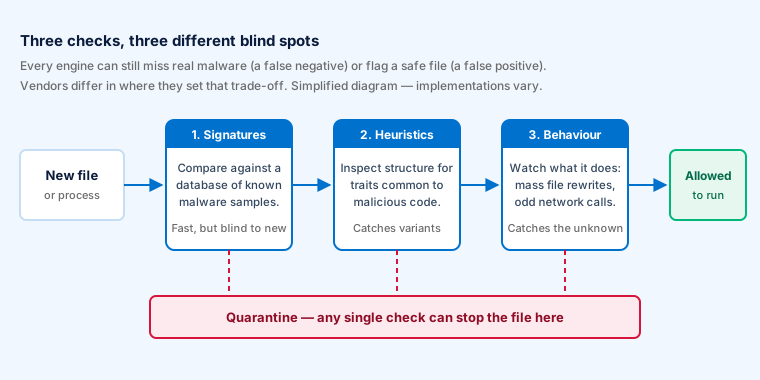
Signature matching compares a file against a database of known malicious samples. It is fast and produces very few false alarms, and it is blind to anything the vendor has not seen and catalogued yet.
Heuristic analysis looks at the structure of a file for traits that malicious code tends to share — packing, obfuscation, suspicious imports — without needing an exact match. It catches variants of known families, at the price of occasionally flagging unusual but legitimate software.
Behavioural monitoring watches what a program does once it is running: mass file rewriting of the kind ransomware performs, attempts to modify system boot settings, connections to known command servers. This is the layer with a realistic chance against something genuinely new, and it is also the layer most likely to interrupt you over something harmless.
Most products, TotalAV included, also submit file metadata or samples to a cloud reputation service. That improves detection and means the product is sending information about your files somewhere — a trade-off worth reading the vendor’s privacy policy about, whichever product you choose.
The consequence for you
No engine catches everything, and an engine tuned to catch more will also interrupt you more. When you see a detection rate quoted, look for the false-positive figure next to it. A product that blocks 100 % of threats and also blocks your accounting software is not a good product.
Independent lab testing, and how to read it
Three independent laboratories publish comparative consumer antivirus testing that is worth reading: AV-TEST in Germany, AV-Comparatives in Austria and SE Labs in the United Kingdom. Their methodologies differ, they publish their methodologies, and they test against live samples rather than vendor-supplied ones.
TotalAV has appeared in public test rounds from these laboratories, though not in every round of every year — participation is voluntary and vendors choose which tests to enter. That is not in itself a criticism; it is a reason to check the current round rather than an award badge of unknown vintage.
Reading a lab result honestly
- Check the date. A result from three years ago describes an engine that no longer exists. Threat landscapes and product code both move.
- Check which test. “Real-world protection” and “malware protection” measure different things; a product can do well in one and poorly in the other.
- Check the false-positive column. It is usually printed next to the detection figure and usually ignored in marketing.
- Check who paid. Labs are commercial; vendors pay to be tested. Reputable labs publish their funding model and their full field of participants, which is how you spot a test where the weakest competitors were simply not entered.
- Be sceptical of any badge without a link. If a product page shows an award image with no link to the underlying report, treat it as decoration.
What we are not going to do
We have not run our own laboratory tests, and we are not going to invent numbers that look like we did. Anywhere you see a detection percentage on a website with no named laboratory, no test date and no link to a published report, assume it was made up.
The bundled VPN: what it hides and what it does not
The VPN is the component most often misunderstood, and the one where over-claiming is most common across the whole industry — not only by this vendor.
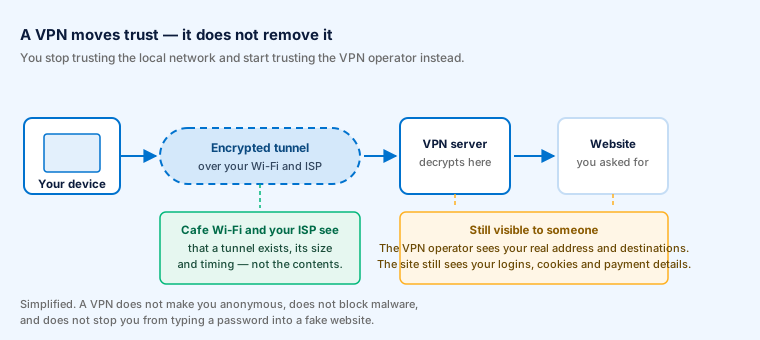
A VPN creates an encrypted tunnel between your device and a server run by the provider. Your traffic emerges from that server, so the websites you visit see the server’s address rather than the one your internet provider gave you, and anyone watching the local network — a café hotspot, a hotel, your ISP — sees only that an encrypted tunnel exists.
The vendor states that its VPN uses AES-256 encryption and that it does not log browsing activity. Both are ordinary claims in this market. We have seen no independent audit of this particular no-logging claim, and in the absence of one, a no-logs policy is a promise rather than a verified fact. That is true of most consumer VPNs; a handful have commissioned published third-party audits, and it is reasonable to ask for one.
What a VPN does not do
- It does not make you anonymous. You are still logged into your accounts; the sites you use still know exactly who you are.
- It does not block malware. That is a different component.
- It does not stop phishing. An encrypted tunnel to a fraudulent site is still a fraudulent site.
- It does not remove trust — it moves it. You stop trusting the café Wi-Fi and start trusting the VPN operator, who can see everything the café could have.
- It does not universally unlock streaming catalogues. Streaming services detect and block VPN ranges continuously; any claim of guaranteed access is unreliable by nature.
Bundled VPNs in security suites are generally lighter than dedicated VPN services: fewer server locations, fewer protocol options, less granular configuration. For encrypting a laptop on hotel Wi-Fi that is usually sufficient. For anything where the consequences of a leak are serious, a dedicated audited provider is the more defensible choice.
The password manager
Of everything in the bundle, the password manager is the component most likely to materially reduce your risk — not because the software is remarkable, but because password reuse is the single most exploited weakness in consumer security. A breach at one forum becomes a compromised email account only because the same password was used twice.
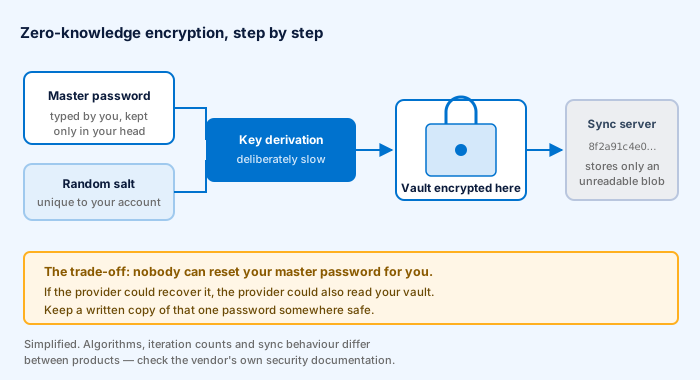
The architecture in the diagram is the industry standard, sometimes marketed as “zero-knowledge”. Your master password never leaves your device; it is stretched by a deliberately slow key-derivation function into an encryption key, and the vault is encrypted locally before anything is synchronised. The provider stores a blob it cannot read.
A note of correction, because this is often stated wrongly: a synchronising password manager does keep an encrypted copy of your vault on the provider’s servers. That is how it reaches your phone as well as your laptop. “Encrypted on your device” and “not stored in the cloud” are different claims, and only the first one is true of any manager that syncs.
The unavoidable trade-off
Because the provider cannot read your vault, the provider cannot reset your master password either. If you lose it, the vault is gone. Write that one password down and keep the paper somewhere physically safe — this is one of the rare cases where paper is the right medium.
Whichever manager you use, turn on two-factor authentication for the manager itself, and for your email account above all. Email is the reset channel for everything else.
Breach and “dark web” monitoring
“Dark web monitoring” is a dramatic name for something fairly mundane: the service indexes data sets that have leaked or been traded, and tells you if your email address appears in one.
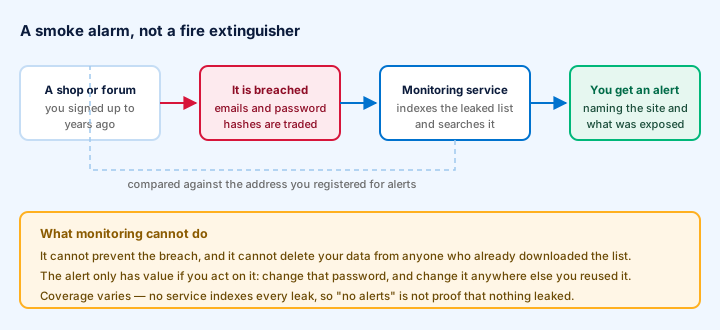
This is genuinely useful, and its usefulness is narrow. The alert arrives after the fact. It cannot remove your data from anyone who already has it. It is worth something only if you act on it — change the password for the named service, and change it anywhere you reused it.
Coverage also varies between providers, because no one indexes every leak. An absence of alerts is not evidence that nothing about you has leaked. Free services exist that perform the same lookup, so this component is best treated as a convenience within a bundle rather than a reason to buy one.
Device clean-up tools: realistic expectations
This is the part of the suite where the industry as a whole has the weakest record, and it deserves plain speech.
Clearing temporary files and browser caches recovers disk space. On a drive that is nearly full, recovering space can improve responsiveness, because operating systems behave badly with almost no free space. Reviewing what launches at startup can shorten boot times if something unnecessary is loading. Those are real, modest, measurable effects.
What clean-up tools cannot do is make a slow computer fast. If a machine is slow because it has too little memory, a mechanical hard disk, or an aging processor, no software removes that constraint. Claims of dramatic speed gains from a cleaning utility should be read as marketing.
A correction we made to an earlier version of this page
An earlier draft of this article said the clean-up tool defragments your disk. We removed that. Defragmentation is a concept from mechanical hard drives; on a solid-state drive — what most computers sold in the last decade use — it is unnecessary and causes needless write wear. Modern Windows handles both drive types automatically. If any product offers to defragment your SSD, that is a reason for caution, not a feature.
Performance and system impact
Real-time protection works by inspecting files as they are opened, written and executed. That inspection has a cost. On a modern machine with an SSD and adequate memory it is usually not perceptible in everyday use; during a full scan, or on older hardware, it is.
We have not conducted our own benchmark of this product, so we are not going to quote a scan duration or a percentage of CPU. Both figures depend on the size of your drive, the speed of your storage and what else is running, and any single number published without those conditions stated is close to meaningless. AV-Comparatives publishes a dedicated performance test with a described methodology; that is the figure worth looking up.
Two practical points that matter more than benchmarks
- Never run two real-time scanners at once. They inspect each other’s activity and can slow a machine far more than either alone. Installing a third-party antivirus on Windows normally deactivates Microsoft Defender’s real-time component automatically — that is by design and correct.
- Schedule full scans for when you are not working. The background component is light; the full scan is not.
Pricing, renewal and cancellation
We do not publish prices, because they change frequently, differ by country and currency, and any figure we printed would be wrong within weeks. What does not change is the structure of the offer, and that is what you should understand before paying.
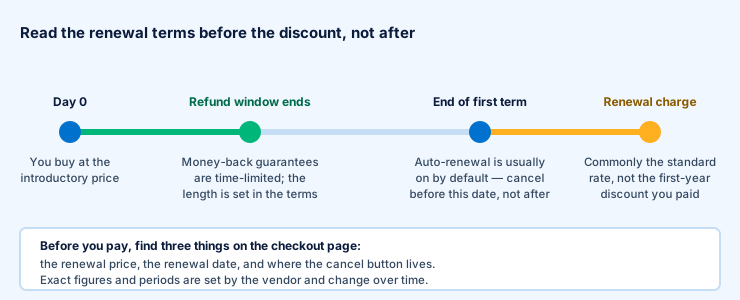
Consumer security software is sold on a discounted first term followed by automatic renewal. The introductory price is genuine; the renewal price is typically the standard rate, which can be substantially higher. This is a lawful and common model, and it is also the single most frequent source of complaints in this category, precisely because people remember the first price and not the second.
The four things to establish at the checkout page
- The renewal price and date. Under EU consumer law a trader must give you clear pre-contractual information about the total price and the duration of the contract before you are bound. It will be on the page; read it.
- The length of the money-back window, and what conditions apply to it. A money-back guarantee is a contractual promise from the vendor and is separate from your statutory rights.
- Where the cancellation setting is. Find it before you need it.
- How many devices and which platforms the plan covers.
Your statutory right of withdrawal in the EU
For distance contracts concluded with a trader, EU consumer law gives you a 14-day right of withdrawal. For digital content and services there is an important exception: if you expressly ask for performance to begin immediately and acknowledge that you lose the right of withdrawal, you can lose it. That acknowledgement is often a tick-box at checkout. This is general information about your rights, not legal advice about your particular contract.
A claim we removed
An earlier version of this page advertised a “30-day free trial, no credit card required”. We removed it. TotalAV does publish a free tier, and paid plans are advertised with a money-back guarantee period, but those are not the same thing as a no-card trial of the full suite, and the conditions are set by the vendor and change. Check what is actually offered on the vendor’s current checkout page.
Do you need paid antivirus at all?
This is the question a page funded by partner commissions is least expected to ask, which is exactly why it belongs here.
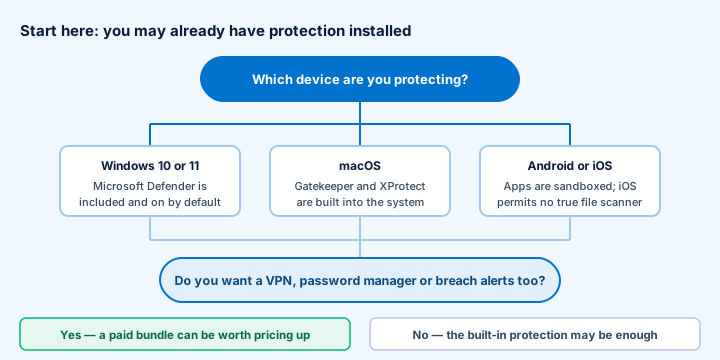
Current Windows ships with Microsoft Defender Antivirus built in and switched on, at no extra cost, and it has performed respectably in independent laboratory testing for several years. macOS has Gatekeeper, XProtect and mandatory notarisation of distributed software. Android applications are sandboxed and Google Play Protect screens apps. On iOS, the sandbox means no third-party app can scan another app’s files at all — an iOS “antivirus” is in practice a web filter, a VPN and a breach-alert tool wearing the name.
So the honest case for paying is not “you are otherwise unprotected”. It is one of these:
- You want the bundled extras — a VPN, a password manager, breach alerts — and would otherwise pay for them separately.
- You want one interface and one support contact rather than several.
- You are buying for someone who will not maintain several separate tools.
- You want a specific capability the built-in tools lack on your platform.
If none of those apply, keeping the built-in protection enabled, applying updates promptly and using a password manager with two-factor authentication covers most of the realistic risk for a home user.
One suite, or separate specialist tools?
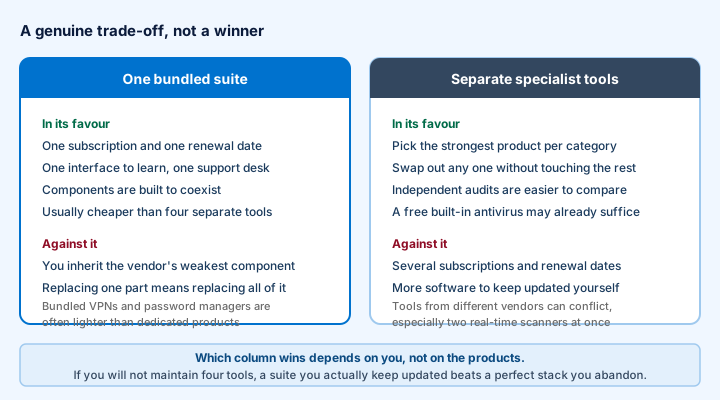
The strongest argument for a bundle is not technical, it is behavioural: software you actually keep paid for and updated protects you, and software you meant to renew does not. The strongest argument against is that you inherit the vendor’s weakest component along with its best, and you cannot replace one part without replacing the whole thing.
An earlier version of this article compared TotalAV against a caricature of “typical alternatives” that no real product matched. We replaced it with the diagram above, which sets out the actual trade-off. There is no universally correct answer.
Where any antivirus sits in a layered defence
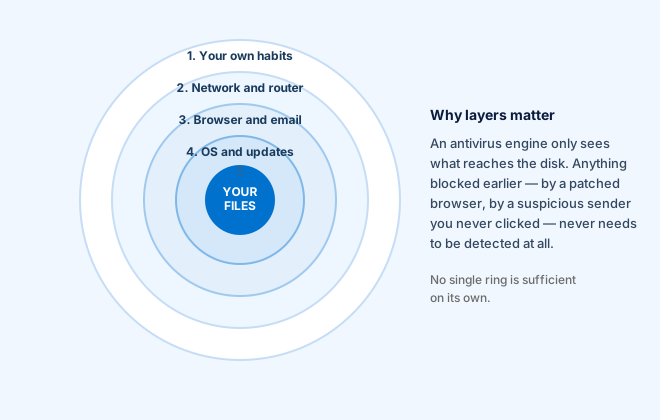
An antivirus engine is one ring of several, and not the outermost. Most successful attacks on home users do not defeat a scanner; they avoid it, by persuading a person to type a password into a convincing fake page, approve a payment, or install something willingly.
Which is why the measures that cost nothing are worth more than any subscription:
- Apply operating system and browser updates promptly. Most exploited vulnerabilities already had a patch available.
- Use unique passwords and a manager to hold them.
- Turn on two-factor authentication, starting with your email.
- Keep offline or versioned backups. This is the only reliable answer to ransomware, and no scanner substitutes for it.
- Learn to recognise phishing. Our security basics guide covers the signals in detail.
Limitations and fair criticisms
- Aggressive marketing. Products in this category, TotalAV among them, have been promoted through scan-result pop-ups and countdown framing. If a page tells you your computer is infected before it has scanned anything, it has not scanned anything.
- Renewal pricing. The gap between introductory and standard rates is the most common complaint across the whole category.
- Bundled components are lighter than specialists. Expect a competent VPN, not a best-in-class one.
- Uneven lab participation. Fewer public data points than the longest-established vendors means less independent evidence to weigh.
- Upselling inside the product. Suites in this category commonly prompt to upgrade from within the interface.
Who it suits, and who it does not
A reasonable fit if
- You want antivirus, a VPN, a password manager and breach alerts under one subscription.
- You value a single simple interface over per-component configurability.
- You are equipping a household or a non-technical relative and want one thing to renew.
- You have read the renewal terms and are content with them.
Probably not the right choice if
- You want a VPN with a published independent audit of its no-logs claim.
- You want maximum configurability or enterprise management.
- You are on Windows, already use a password manager, and want nothing else — Defender may already be sufficient.
- You are buying for iOS expecting file scanning, which the platform does not permit.
If you have read this far and the bundle matches what you want, the partner link below goes to the vendor’s own site, where the current plans, prices and terms are set out.
How this article was produced
Written and edited by Oliver Cook, responsible editor of this site, and published on .
The descriptions of components are drawn from the vendor’s published product and support material. The explanations of how detection, VPN tunnelling, password-vault encryption and breach monitoring work are general to the category, not specific claims about this product’s implementation. Where we could not verify something independently, we have attributed it to whoever asserts it, or said plainly that we do not know.
We have not run laboratory tests and we do not publish numerical scores. We have not accepted payment for coverage, and no vendor reviewed this page before publication. The site is funded by partner commissions, disclosed on every link — see the editorial policy for the full account, including our corrections procedure.
Where this page and the vendor disagree, the vendor’s own current information prevails. Features, plans, prices and terms change without notice. If you find an error here, please tell us and we will correct it and record the correction.
The visuals on this page are original. All eight diagrams were drawn for this article as SVG files and are hosted on this server. No product screenshots, vendor artwork or stock photography are used anywhere on this site.
Sources
- TotalAV product, plan and support documentation published by the vendor. Primary source for what is included in each plan. Prevails over this page.
- AV-TEST Institute — comparative consumer antivirus testing and published methodology. av-test.org
- AV-Comparatives — real-world protection, malware protection and performance test series. av-comparatives.org
- SE Labs — consumer endpoint protection reports. selabs.uk
- Microsoft documentation on Microsoft Defender Antivirus in Windows 10 and 11. learn.microsoft.com
- Apple platform security documentation on Gatekeeper, XProtect and notarisation. support.apple.com
- Directive 2011/83/EU on consumer rights, on pre-contractual information and the right of withdrawal, and Directive 2019/770 on digital content and digital services. eur-lex.europa.eu — general legal framework, cited for context, not as legal advice.
TotalAV is a trademark of its respective owner. This site is independent and is not affiliated with, endorsed by or sponsored by TotalAV, Protected.net or any other vendor named above. Product names are used only to identify the products discussed.